Notion's block limit is a wall. Anytype is how we get past it.
The free plan stops at 1,000 blocks. Deleting won't help.
Add a second person to a free Notion workspace and you hit a 1,000 block wall that deleting cannot undo. Here is our fix.
We found this one out the hard way, mid-project, sharing a workspace with a client. One afternoon it simply stopped letting us add anything new. Not a bug, a billing wall, and no amount of tidying up moved it. This post is what that wall is, and the tool we now keep right beside Notion because of it.
What the block limit actually means
In Notion, a block is almost everything. A line of text is a block. A heading is a block. A to-do, an image, a divider, a table row, a toggle, each one is a block. A single meeting note is easily forty or fifty of them. A small shared workspace burns through 1,000 blocks in a few weeks.
The limit only switches on once a second person joins. Solo, you get unlimited blocks. Add one teammate or even one guest, and the 1,000 block cap applies to the whole workspace. For a studio that works with clients in shared spaces, that is the normal case, not the edge case.
And it is a ratchet. The count is lifetime-created, not currently-in-use. You can delete a thousand blocks and still be locked. You keep read and edit access to what exists, but you cannot add anything new. The only exits are paying or starting a fresh workspace.
The other paper cuts
The block wall is the loud problem. The quiet ones add up too.
- Files cap at 5MB each on the free plan, so a single design export or a slightly heavy PDF can be too big to attach.
- Offline is an afterthought. Lose signal and you are mostly locked out of your own notes.
- Your data lives on their servers. Export gives you Markdown and CSV, but the relations, views, and structure do not survive the trip intact.
Why Anytype
Anytype is a local-first, open-source notes and knowledge tool. The model is close enough that the muscle memory transfers: objects instead of pages, relations instead of database properties, a graph you can actually see.
- Local-first. Your data lives on your machine and works fully offline. Sync is something you add, not something you depend on.
- End-to-end encrypted, and open source. You can read the code, and you can self-host the sync node if you want to.
- No artificial block or object cap. The limit is your disk, not a billing tier or a member count.
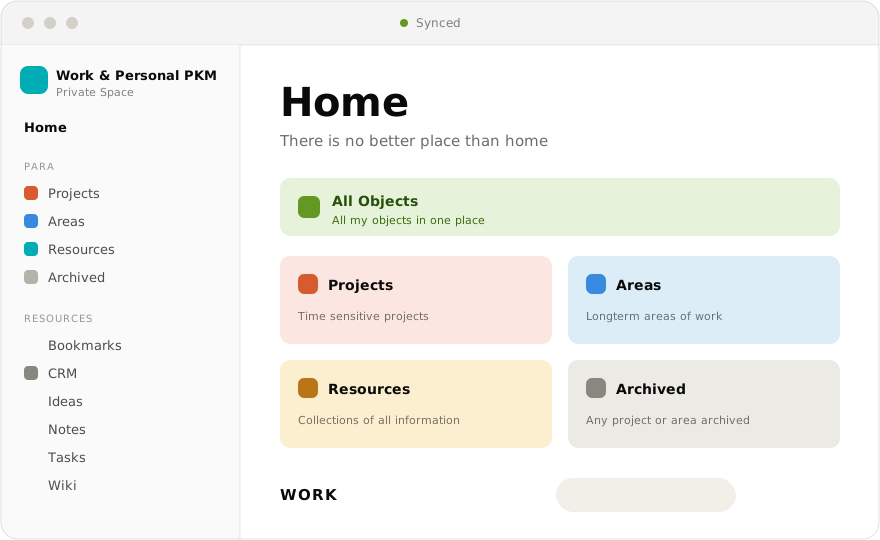
Here is the contrast that made us keep it around:
The honest tradeoffs
Anytype is not a drop-in clone, and we would be lying to say it is.
- No live multiplayer cursors. Sync is eventual, not real-time co-editing, so it suits shared knowledge better than two people typing in one doc at once.
- The ecosystem is younger. Fewer templates, fewer integrations, a smaller community than Notion's.
- Publishing a page to the public web is not as turnkey as Notion's share-to-web.
So we do not pretend one replaces the other. Notion still wins for real-time collaboration and quick public pages. Anytype wins when we want ownership, offline, encryption, and no cap counting down in the background.
More to come
This is the first note in a series. We are going to open up our actual Anytype setup: the PARA space we run work and personal life in, the client CRM, how we keep research and notes synced across the team, and the small workflows that make it stick. If there is a part of the setup you want to see first, tell us. You can find Anytype, and the rest of what we reach for, on the tools page.
Next step: if you have hit the wall, point Anytype at the same notes for a week and see how it feels. Update: it did not stay a perfect fit forever, see where Anytype got too restrictive. More of the tools we reach for are on the tools page. If your team just hit the same wall mid-project, write to us at hello@gattyworks.com.